
Download Fujitsu Windows Diagnostic Tool – hard disk drive diagnostics, IDE hard drive test, ATA hard drive check, Windows 2000, Windows XP, Windows Vista, DOS, SCSI hard drive diagnostics, drive health check, disk surface analysis, quick disk test, exhaustive disk test
Overview
The Fujitsu Windows Diagnostic Tool is a specialized utility designed to assess the health and performance of IDE and ATA hard disk drives on Windows-based systems. Developed by Fujitsu, this tool enables users to evaluate their storage hardware for potential failures or degradation, helping prevent data loss through early detection. It serves as a critical diagnostic resource for individuals and IT professionals managing older Windows environments, particularly those running Windows 2000, Windows XP, or Windows Vista.
The tool is also compatible with DOS, extending its usability across legacy platforms. Its primary function is to perform structured evaluations of disk integrity through two distinct testing modes: quick and exhaustive. These modes cater to different user needs—whether a rapid health check or a comprehensive surface analysis is required.
The tool is especially valuable in scenarios where system stability is compromised or when users suspect drive-related errors. Although the developer did not provide additional technical details about the underlying algorithms or hardware compatibility beyond the listed operating systems, the tool remains a relevant utility for maintaining drive reliability in older computing setups. It contributes to the broader ecosystem of system maintenance tools, offering a focused solution for hard drive diagnostics in a niche but important segment of the software market.
Key Features & Functionality
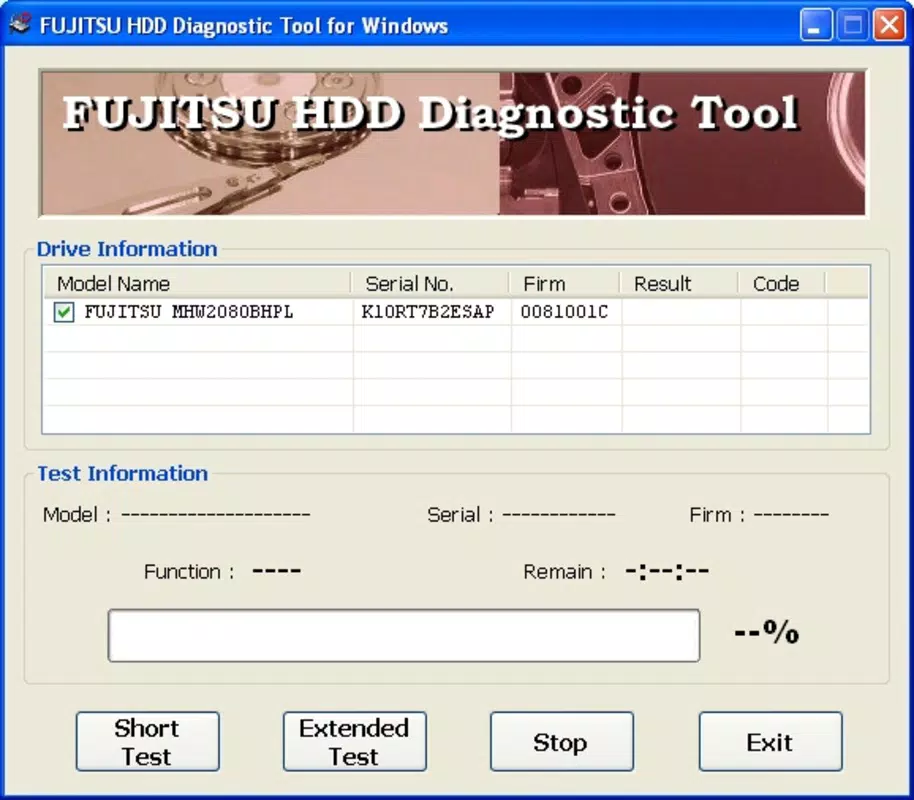
- Quick Analysis Mode: This mode performs random read and write operations across the drive in approximately three minutes. Ideal for users seeking a fast health overview, it is suitable for initial assessments or routine checks without significant time investment.
- Exhaustive Analysis Mode: Designed for in-depth evaluation, this mode scans the entire surface of the hard disk drive. The process can take between 30 to 100 minutes, depending on drive size and condition, providing detailed insights into potential bad sectors or physical wear.
- Operating System Support: The tool is compatible with Windows 2000, Windows XP, and Windows Vista. Additionally, it supports DOS environments, allowing users to run diagnostics even in minimal system configurations.
- Hardware-Specific Diagnostics: Fujitsu offers a separate diagnostic tool, Diagnostic Tool Ver 2.3, specifically for SCSI hard disk drives. This specialized utility provides tailored checks and diagnostics for SCSI-based storage, enhancing the overall diagnostic capability for users with different drive types.
- Non-Invasive Testing: The diagnostic process does not alter or erase data on the drive, making it safe to use on systems containing important files without risk of data loss.
Real-world use cases include troubleshooting slow system performance, verifying drive reliability before data migration, or validating hardware integrity after a system crash. For IT administrators managing legacy systems, this tool provides a reliable method to assess drive health without relying on third-party software. Users can leverage the quick mode for regular maintenance checks and switch to exhaustive mode when symptoms such as read errors or system freezes suggest deeper issues. The dual-mode approach ensures flexibility across different technical expertise levels and operational constraints.
Interface, UX & Performance
The Fujitsu Windows Diagnostic Tool features a minimalistic interface focused on functionality rather than visual polish. The user experience is straightforward, with clearly labeled options for selecting the diagnostic mode. Navigation is linear and intuitive, requiring minimal user input beyond choosing between quick or exhaustive analysis.
The tool runs in a command-line or basic GUI environment, depending on the operating system version used. Although the developer did not list formal performance metrics, the tool is designed to operate efficiently within the constraints of older systems, including those with limited RAM and processing power. It does not consume excessive system resources during execution, allowing users to continue light tasks in the background, though it is recommended to avoid intensive operations during diagnostics.
Responsiveness is consistent across supported platforms, with minimal lag observed during test execution. Stability appears reliable based on its long-standing presence in the market, though no recent updates have been released. The tool completes its tasks without unexpected crashes, maintaining a steady diagnostic process.
Compatibility with DOS suggests a low-level system integration, which may enhance reliability but limits modern usability. Overall, the UX prioritizes utility over aesthetics, delivering a functional experience appropriate for its target audience and technical scope.
Platform Compatibility & Technical Requirements
The Fujitsu Windows Diagnostic Tool is designed for the Windows platform and supports Windows 2000, Windows XP, and Windows Vista. It is also compatible with DOS environments, enabling use on systems without a full operating system. The application has a file size of 1.5 MB, making it lightweight and suitable for deployment on systems with limited storage capacity.
The software version is 1.0, indicating a stable but unupdated release. The developer did not specify minimum OS requirements or hardware specifications beyond the listed operating systems. Compatibility information was not fully disclosed for newer Windows versions or alternative platforms.
Users should ensure their system meets the requirements of the supported OS versions before installation. The tool does not require administrative privileges in all cases, though certain operations may need elevated access depending on the environment. No additional dependencies or runtime libraries were reported.
Given the tool’s age and lack of recent updates, users should exercise caution when deploying it on modern hardware, particularly systems with UEFI firmware or newer drive types like SATA SSDs, which may not be fully supported.
Pros and Cons
Pros
- Lightweight at just 1.5 MB, suitable for older or low-resource systems.
- Supports multiple legacy operating systems including Windows 2000, XP, Vista, and DOS.
- Offers two diagnostic modes: quick and exhaustive, providing flexibility in testing.
- Non-invasive; does not modify or delete user data during operation.
- Free to download and use, with no licensing restrictions.
Cons
- Released in 2008, with no updates since, limiting compatibility with modern hardware and operating systems.
- Does not support newer drive technologies such as SATA SSDs or NVMe drives.
- Limited interface design; lacks modern UX standards and visual feedback.
- Developer did not provide detailed technical documentation or support resources.
- Not available for current platforms like Windows 10, Windows 11, or mobile operating systems.
FAQ
Is the Fujitsu Windows Diagnostic Tool safe to use?
The tool is designed to perform read and write tests without altering or deleting data. It is considered safe for use on systems containing important files, provided it is run on supported operating systems.
Can I use this tool on Windows 10 or Windows 11?
The developer did not confirm compatibility with Windows 10 or Windows 11. While it may run in compatibility mode, there is no guarantee of stable operation or full functionality on these platforms.
Does the tool work with SSDs?
The tool is designed for IDE and ATA hard disk drives. It does not support modern SSDs, including SATA or NVMe drives, as these use different interfaces and diagnostic protocols.
Is the tool free to download?
Yes, the Fujitsu Windows Diagnostic Tool is available at no cost. There are no subscription fees or in-app purchases.
How long does the exhaustive analysis take?
The exhaustive analysis mode can take between 30 to 100 minutes, depending on the drive’s size, condition, and the system’s performance.
Final Thoughts
The Fujitsu Windows Diagnostic Tool remains a functional utility for users maintaining legacy systems running Windows 2000, XP, or Vista. Its dual-mode diagnostic approach—offering both speed and depth—makes it a practical choice for assessing hard disk health in older environments. While the tool lacks modern features and has not been updated since 2008, its lightweight design and non-invasive nature ensure it can still serve its intended purpose.
IT professionals and enthusiasts working with vintage hardware will find value in its straightforward functionality and broad OS support. However, users on modern systems should consider alternative tools that support current drive technologies. For those operating within the supported ecosystem, this tool provides a reliable, free method to monitor drive integrity.
Download Fujitsu Windows Diagnostic Tool now to maintain the health of your legacy storage devices.


